

How to set up ChatGPT Ads in Singapore, start to finish
A step-by-step walkthrough of OpenAI Ads Manager for Singapore businesses, built from a live account setup with real screenshots.
The short version: sign in at ads.openai.com, enter your business details exactly as they appear on your ACRA record, and set Singapore, SGD and Singapore time, because those three can't be changed later. Then fix the draft campaign OpenAI builds from your website, write 5 to 15 context hints per ad group, upload your real logo and add billing. Make sure OpenAI's crawlers (OAI-AdsBot and OAI-SearchBot) can reach your site. Budget at least SGD 25 a day and allow about a week for account review.
- 00Before you start
- 01Sign in to Ads Manager
- 02Start the account setup
- 03Tell OpenAI about your business
- 04Review the draft campaign
- 05Set up the campaign
- 06Set up the ad group
- 07Write the ad
- 08Fix the business logo
- 09Accept terms and set up billing
- 10Clear account review
- 11Set up conversion tracking
- ✓Launch checklist
- ?Common questions
What ChatGPT Ads is, and whether you can run it
ChatGPT Ads are sponsored placements shown inside ChatGPT conversations. OpenAI matches ads to what the person is talking about, not to a keyword list. Ads are only shown to people on the Free and Go plans. Plus, Pro and Enterprise users do not see them.
Singapore opened on 23 September 2026, together with Indonesia, Malaysia, the Philippines, Thailand, Vietnam and Taiwan. Singapore businesses can now sign up and run their own campaigns at ads.openai.com. If you'd like the bigger picture first, see our ChatGPT Ads Singapore overview.
Check your category first
This is the step most people skip. OpenAI's ad policy (last updated 10 September 2026) is much stricter outside the US.
| Category | In Singapore | Notes |
|---|---|---|
| Retail, e-commerce, consumer goods | Allowed | Standard review. |
| Local services (salons, beauty, home services) | Allowed | Keep claims factual. No medical claims. |
| Travel, entertainment, education, software | Allowed | Standard review. |
| Health services (clinics, aesthetics, dental, supplements) | Generally prohibited | Only allowed case by case in the US right now. |
| Legal services | Prohibited | Only US-licensed practitioners. |
| Financial services | Generally prohibited | Budgeting tools and courses may be fine. |
| Alcohol, gambling, dating, political, cannabis | Prohibited | Everywhere. |
What you need before you start
- An OpenAI account (Google, Apple, Microsoft or email login)
- A legal entity based in Singapore, with the exact registered name
- A public website that OpenAI's crawlers can reach (see Step 10)
- A square logo (PNG or JPG) and at least one square ad image, 256 × 256 px or larger
- A credit card and a finance email address for invoices
Sign in to Ads Manager
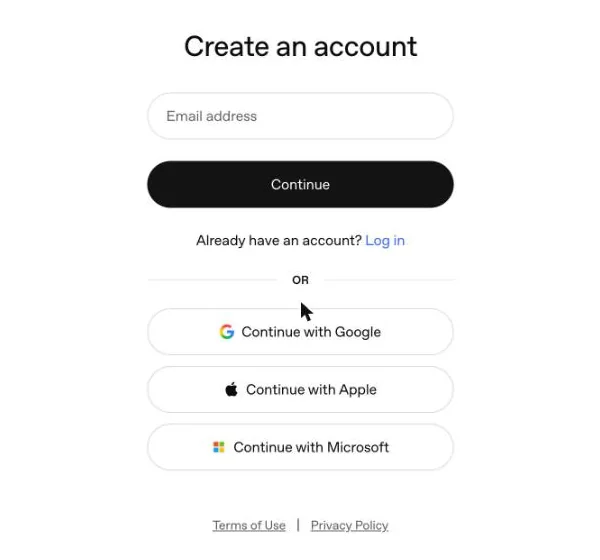
Go to ads.openai.com and sign in, or create an OpenAI account. Use a shared business login rather than a personal one. The person who creates the account becomes the account owner.
Already running an ad account for another business? Click your business name at the bottom left, hover over it, then click + Create account. One login can own up to 10 ad accounts.
Every client gets its own ad account. Don't run two brands out of one account, because the logo, business name and billing are set per account.
Start the account setup
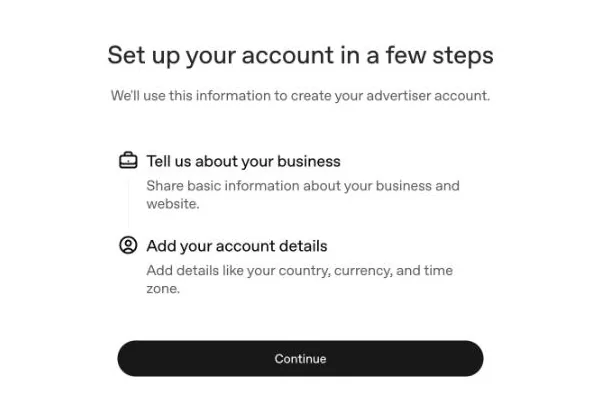
OpenAI walks you through two short forms. Click Continue.
Everything you enter here is used to review your account, so it has to match your company records and your website.
Tell OpenAI about your business
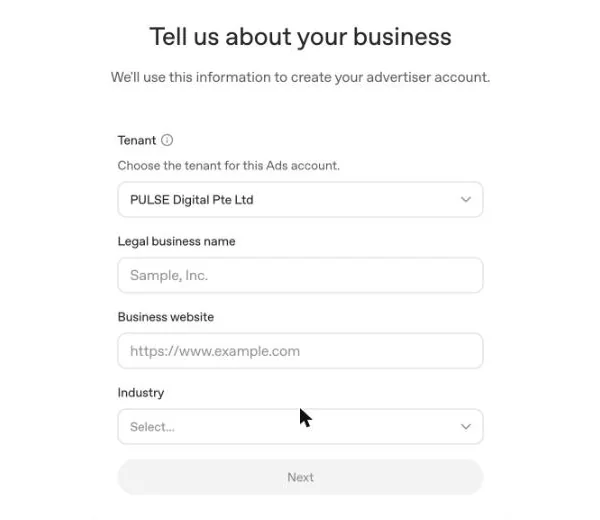
Tenant. The business group this ad account sits under. Agencies can create client accounts under their own group.
Legal business name. Use the name exactly as it appears on your ACRA record, for example "DR. LASH PTE LTD". This also becomes your default campaign name and the name shown on your ads.
Business website. Your homepage, starting with https. OpenAI crawls this to review your account and to pre-fill your first ad.
Industry. Choose the closest match from the list.
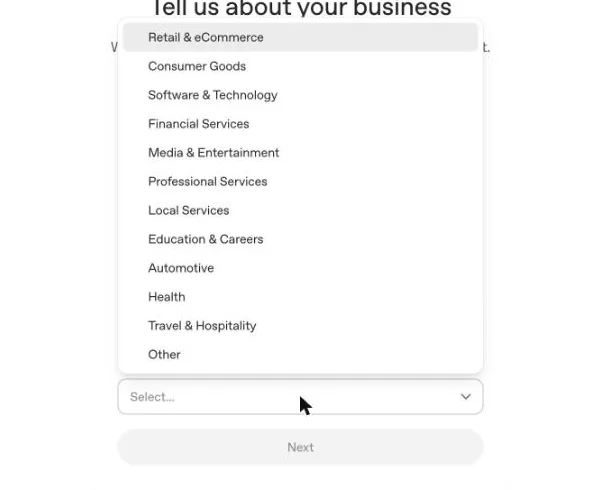
For a lash or brow salon, choose Local Services. Only choose Health if you really are a health provider, and remember health ads are generally not allowed outside the US yet.
Account details (next screen)
Next you set country, currency and time zone. For a Singapore business, choose Singapore, SGD and Singapore Standard Time.
Country, currency and time zone are locked once the account is created. If you get one wrong, you'll have to open a new ad account.
Review the campaign OpenAI builds for you
After setup, Ads Manager reads your website and builds a first campaign, ad group and ad for you automatically. You can click Skip for later, but it's usually quicker to edit the draft.
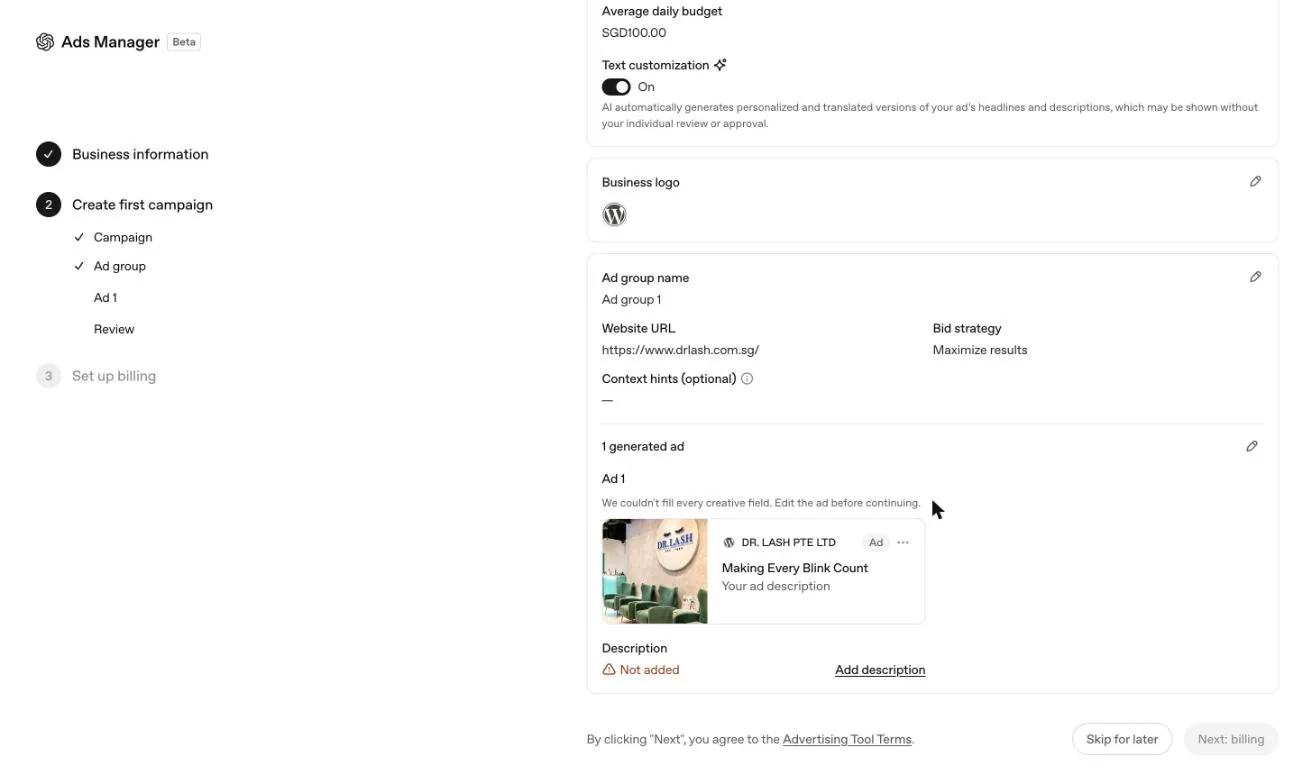
In our test, the generator set SGD 100/day, picked Clicks, pulled the wrong logo from the website's favicon and left the description empty. Next: billing stays greyed out until every ad field is filled in. Check each section, using the pencil icon to edit.
Set up the campaign
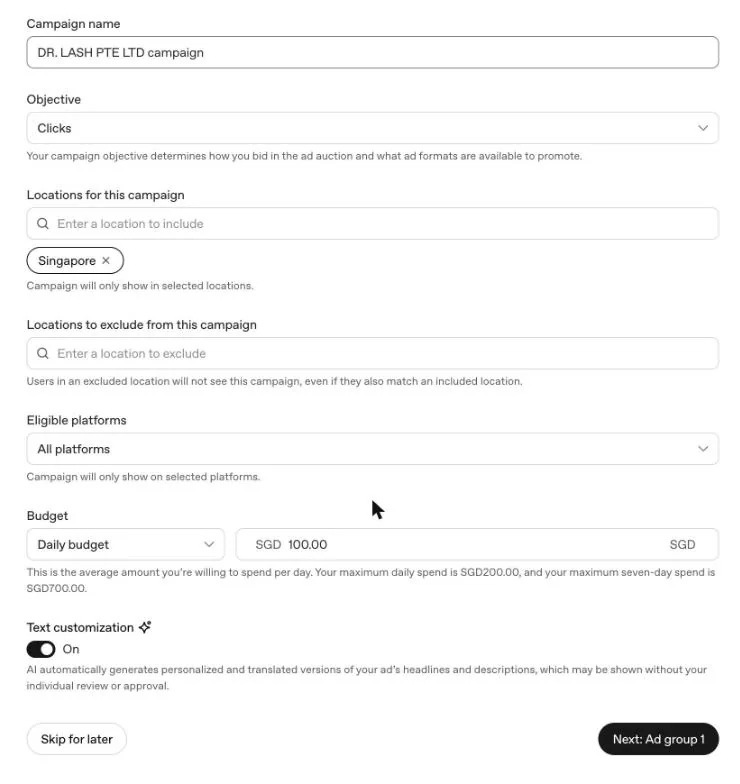
Campaign name. Use a clear pattern, for example DRLASH_SG_Clicks_LashExt_Sep26.
Objective. This decides how you bid and can't be changed later. To use a different objective, you create a new campaign.
| Reach | Pay per 1,000 impressions. Good for awareness. |
| Clicks | Pay per click. The best starting point for most SMEs. |
| Conversions | Optimises for a tracked action. Needs conversion tracking set up first (Step 11). |
Locations. Singapore is filled in already. You can also exclude locations. Only include countries where you actually serve customers.
Eligible platforms. Android app, Android web, Desktop web, iOS app and iOS web. Leave all five on for a first test, then compare performance by platform in reporting.
Budget. For new accounts, use a Daily budget. The daily figure is an average, not a hard cap. Ads Manager spells it out: at SGD 100/day you can spend up to SGD 200 on a single day and up to SGD 700 over any seven days.
The minimum is SGD 25 per day. If you set a campaign total budget, OpenAI doesn't spread it evenly across the days.

OpenAI's AI will write personalised and translated versions of your headline and description, which "may be shown without your individual review or approval". Turn it off if you have strict copy rules or regulated claims.
Click Next: Ad group 1.
Set up the ad group
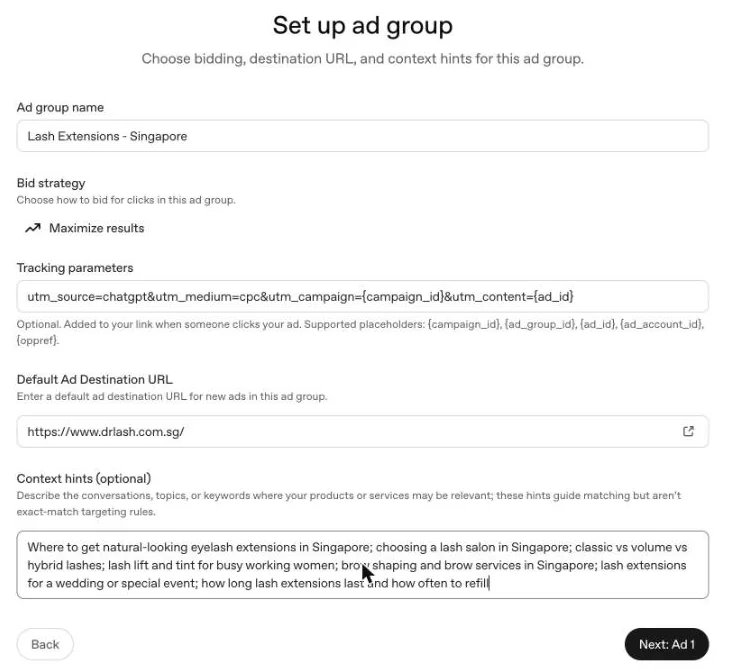
Ad group name. One ad group per service or customer need, for example "Lash Extensions - Singapore".
Bid strategy. Maximize results is the default for Clicks campaigns. Keep it until you have enough data to set a manual maximum bid.
Tracking parameters. These get added to every click. We use:utm_source=chatgpt&utm_medium=cpc&utm_campaign={campaign_id}&utm_content={ad_id}
Available placeholders: {campaign_id} {ad_group_id} {ad_id} {ad_account_id} {oppref}
Default ad destination URL. Link to the most relevant service page rather than your homepage.
ChatGPT Ads has no keyword list. Context hints describe the conversations where your ad fits. They guide matching but aren't strict targeting rules. Write them the way a customer would ask, and be specific: "lash lift and tint for busy working women" works much better than "lashes". Aim for 5 to 15 hints per ad group, separated by semicolons.
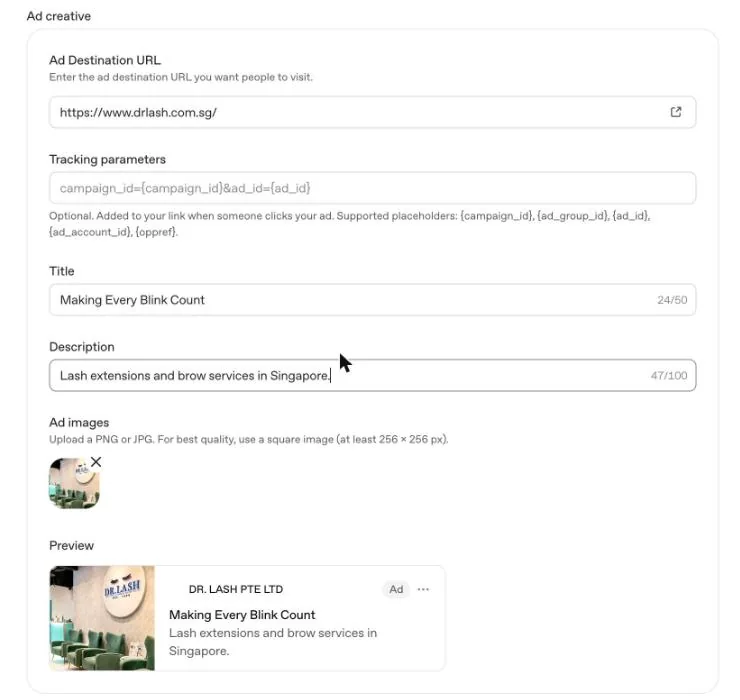
Write the ad
| Field | Spec |
|---|---|
| Title | Max 50 characters. OpenAI suggests 16 to 24. |
| Description | Max 100 characters. Keep it to about 48 or it can get cut off. Ads Manager warns you when it's too long. |
| Image | PNG or JPG, square, at least 256 × 256 px. |
| Destination URL | Must load publicly and must not block OpenAI's crawlers. |
Give each ad a title and description with a different angle. Run 2 or 3 ads per ad group using Add another Ad, so the system has options to test.
Write plainly and specifically. Make every claim one you can back up. No "best in Singapore" unless you can prove it.
Fix the business logo
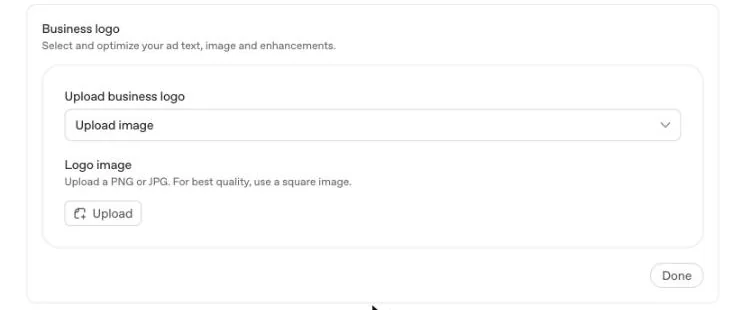
The logo appears next to your business name on every ad. If your site runs on WordPress without a custom favicon, the generator will pull in the WordPress "W", as it did for us.
On the Review screen, click the pencil next to Business logo, then Upload, choose a square PNG and click Done. OpenAI's help centre says ads won't serve until the account name and logo are set properly.
Review, accept terms, set up billing
On Review your first campaign, check every section once more. Clicking Next: billing means you accept OpenAI's Advertising Tool Terms.
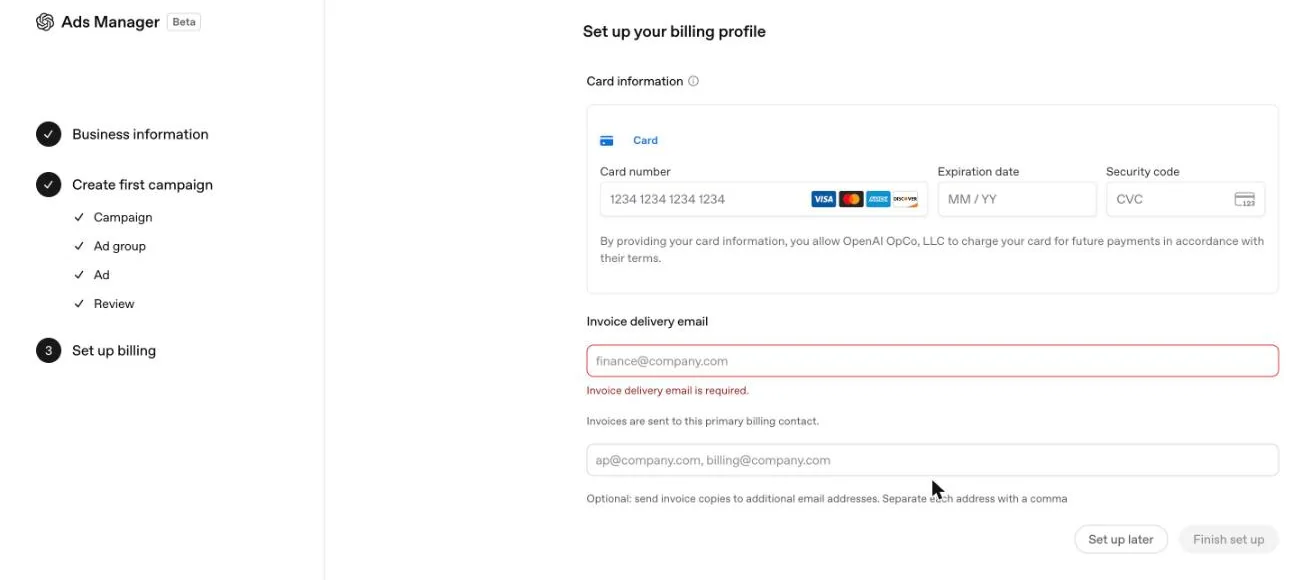
You'll need a card (Visa, Mastercard, Amex and Discover logos are shown), the cardholder's name and billing address, and an invoice delivery email. A shared finance inbox works best. You can add extra addresses to receive copies of invoices. The Business tax ID field is optional.
Click Finish set up. If you click Set up later instead, the campaign is saved but won't serve. It shows "Account payment method invalid" until billing is added, which you can do later from the Finish set up banner or the Billing menu.
Reports use your account time zone (Singapore), but the dashboard footer notes "Billing uses UTC". Singapore is UTC+8, so daily totals on invoices won't match your daily reports exactly.
Clear account review
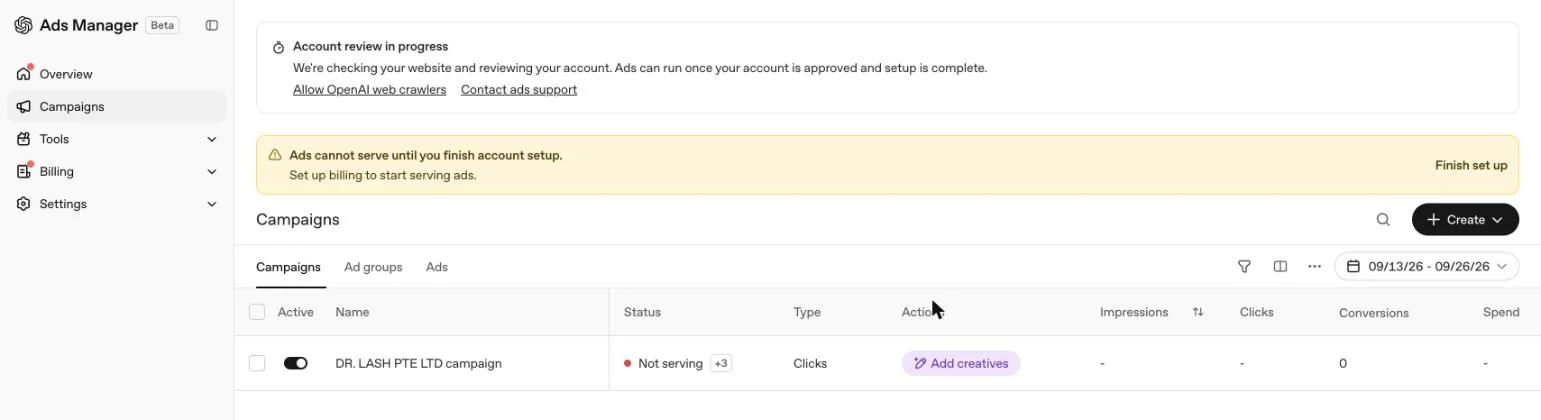
Once you're through setup, the campaign shows Not serving. Hover over the +3 tag next to the status to see every reason:
We saw this banner too. It means OpenAI couldn't crawl your site, so account review can't finish. Make sure your website, firewall or Cloudflare settings don't block OAI-AdsBot or OAI-SearchBot, then click Check website again. The Allow OpenAI web crawlers link in the banner explains how.
Ads Manager quoted 5 to 7 days to get our account ready. OpenAI doesn't publish a turnaround time for brand review and doesn't offer expedited review, so plan launch dates with at least a week of buffer.
Set up conversion tracking
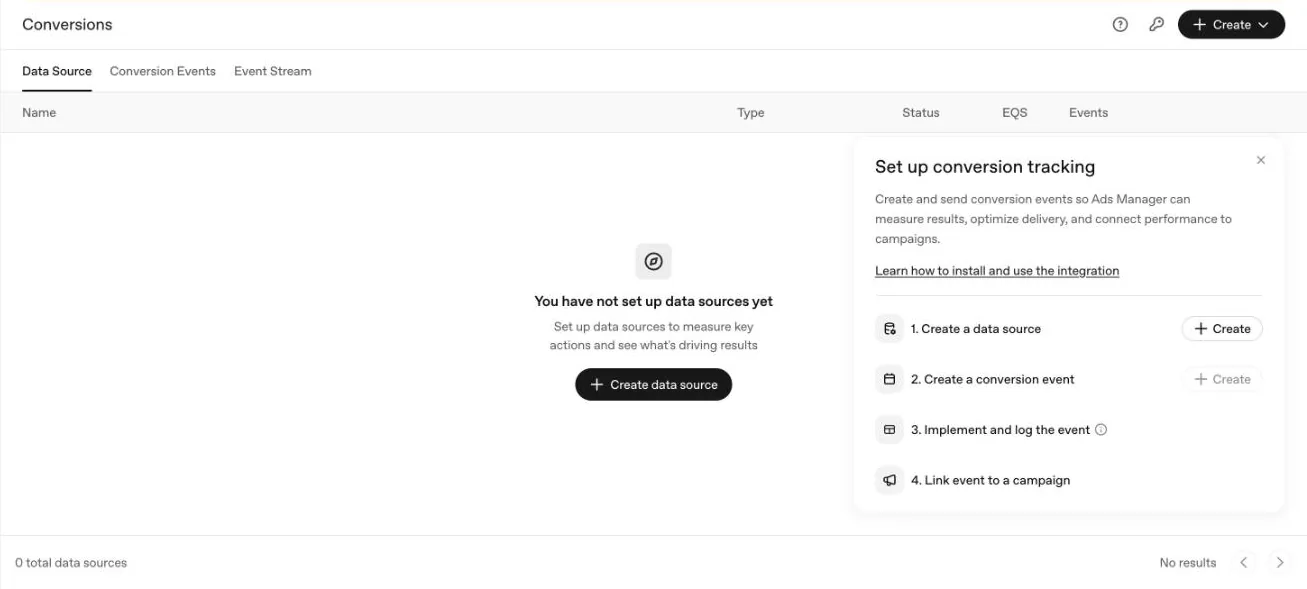
Clicks alone won't tell you whether ChatGPT is bringing in customers. Go to Tools, then Conversions and follow the checklist:
- Create a data source. Choose the Measurement Pixel (runs in the visitor's browser), the Conversions API (sent from your server), or both. If you use both, share one Pixel ID and match event IDs so conversions aren't counted twice.
- Create a conversion event, for example
lead_createdfor enquiry forms ororder_createdfor purchases. You can also define custom events. - Install and fire the event. Put the pixel snippet on your site with your Pixel ID, and fire the event on the thank-you or confirmation step. Then check the Event Stream tab to confirm it's arriving.
- Link the event to your campaign so it shows in the Conversions column. A Conversions-objective campaign needs exactly one active standard event.
Spend takes a few hours to appear, and conversions can take 24 to 48 hours to be attributed. Attribution windows can be set to 7, 14 or 30 days after a click, plus 0 or 1 day after a view.
Also under Settings: General (account name and logo), Users (invite your team or agency by email) and Connected Apps (for example Shopify and HubSpot).
Before you expect your first impression
Account
- Legal name matches ACRA
- Country, currency and time zone set to Singapore / SGD / SGT
- Industry is correct (not "Health" unless it really applies)
- Real logo uploaded, not the favicon fallback
- Billing complete, with no payment-method warning
- Website reachable by OAI-AdsBot and OAI-SearchBot
- Team members invited under Settings, then Users
Campaign
- Objective chosen on purpose (it can't be changed later)
- Daily budget of SGD 25 or more, with the 2x daily cap accepted
- Text customization on or off, as a deliberate choice
- Locations limited to where you actually serve customers
Ad group and ads
- One service or customer need per ad group
- 5 to 15 specific context hints, written the way customers ask
- UTM tracking parameters added
- Links go to service pages, not the homepage
- 2 or 3 ads with different angles
- No claims you can't back up, and nothing medical for beauty services
Measurement
- Pixel or Conversions API sending events (checked in Event Stream)
- Conversion event linked to the campaign
- A GA4 report filtered to
utm_source=chatgpt
First two weeks
Let the campaign run for a week before changing anything. Then compare clicks and cost per click by platform, drop weak ads, add fresh angles, and rewrite context hints that aren't matching. Judge ChatGPT Ads on cost per enquiry or sale, not on how cheap the clicks are.
ChatGPT Ads setup FAQs
What is the minimum budget for ChatGPT Ads in Singapore?
SGD 25 a day, confirmed in Ads Manager. The daily budget is an average rather than a hard cap: OpenAI can spend up to 2x your daily budget on a single day and up to 7x over any seven days.
Who sees ChatGPT ads?
People using ChatGPT on the Free and Go plans. Plus, Pro and Enterprise users do not see ads. Ads are matched to what the person is talking about, not to a keyword list.
Can clinics, law firms or financial firms run ChatGPT Ads in Singapore?
Not at the moment. Under OpenAI's ad policy (updated 10 September 2026), health services are generally prohibited outside the US, legal services are limited to US-licensed practitioners, and financial services are generally prohibited, although budgeting tools and courses may be fine.
Do ChatGPT Ads use keywords?
No. Each ad group has context hints that describe the conversations where your ad fits. They guide matching but aren't strict targeting rules. Aim for 5 to 15 specific hints per ad group, written the way a customer would ask.
How long does it take before ads start serving?
Ads Manager quoted 5 to 7 days to get our account ready. OpenAI doesn't publish a turnaround time for brand review and doesn't offer expedited review, so allow at least a week.
Why does Ads Manager say "Business website unavailable"?
OpenAI couldn't crawl your site, so account review can't finish. Check that your website, firewall or Cloudflare settings don't block OAI-AdsBot or OAI-SearchBot, then click Check website again.
Can I change the country, currency, time zone or objective later?
No. Country, currency and time zone are locked once the ad account is created, and a campaign's objective can't be changed. You'd need a new ad account or a new campaign.
Sources
- OpenAI, "ChatGPT Ads expands to Southeast Asia and Taiwan" (23 Sep 2026)
- OpenAI Ad Policies (updated 10 Sep 2026)
- OpenAI Help Center: Ads Manager Availability, Account Setup, Create Campaigns, Create Ad Groups, Create Ads, Launch Campaigns, Daily Budgets
- OpenAI Developers: Conversion Tracking, Measurement Pixel, Conversions API
- All screenshots: live OpenAI Ads Manager setup for DR. LASH PTE LTD, 26 Sep 2026. The interface is in beta and may change.
- ChatGPT and OpenAI are trademarks of OpenAI. This guide is independent and not endorsed by OpenAI.
Talk to us
ChatGPT Ads only opened in Singapore in September 2026, so it's still early for local businesses. I put this guide together from a real account setup so you can do it yourself.
If you'd rather not, my team at PULSE Digital can take it off your hands. Our specialists handle the policy check, account setup, tracking and ongoing optimisation, and run it alongside your Google, Meta and AI search work so everything is measured in one place.
Send us a message and someone from the team will get back to you with an honest view on whether ChatGPT Ads is worth testing for your business.